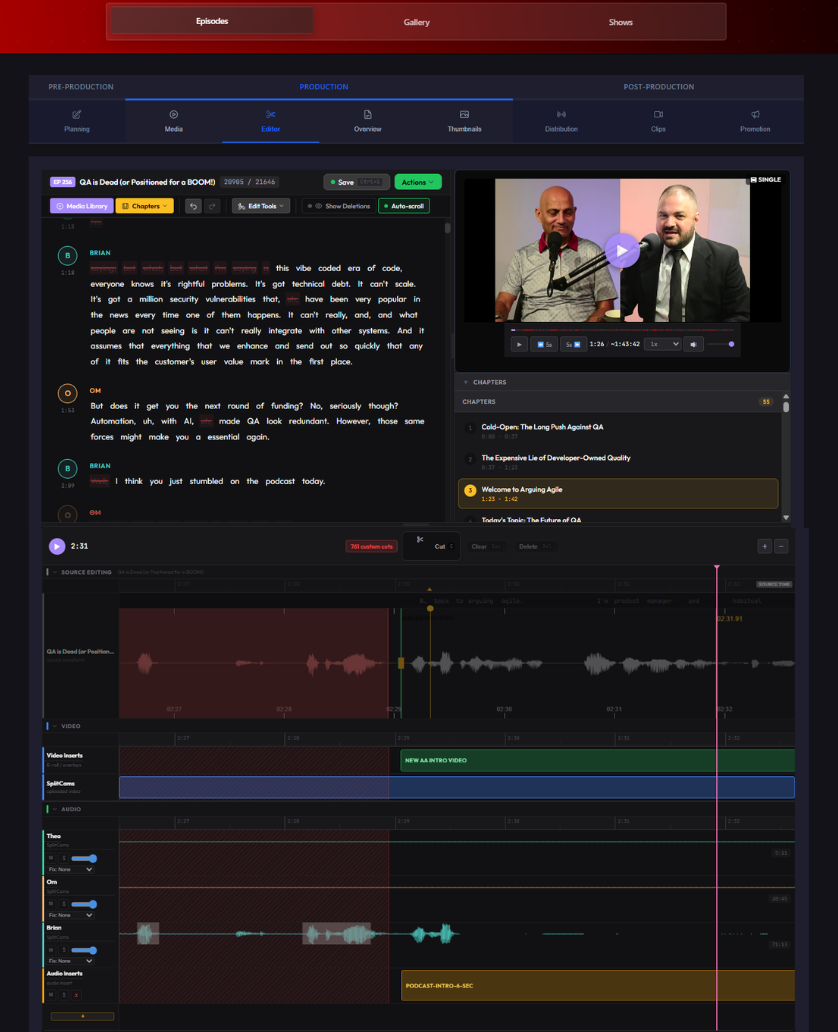
I'm extremely excited about a MASSIVE update to the ShowMuse Editor that released today!
We've certainly come a long way from the first version of the podcast editor that was just the waveform for all speakers plus a transcript. It was easy to use, but this is better!
You can still cut words from the transcript and see it reflected in the waveform, but now it does all those extra things that I kept needing as my podcast evolved like seeing your speakers separated out or being able to manipulate the audio by dragging the intro bumper or either side of a cut to the exact right spot. Little things like adding an audio or video insert from my media library are features I have no idea how I've lived without now that I have them!
This new lightweight DAW-style timeline is a BIG improvement for the editing workflow. Just a reminder, the transcript editor is still there... it still works the same way. I try to not remove or break the simple things that just work!
Every podcaster I know has a moment where they outgrow their editor and I would totally understand someone switching tools to something more powerful and specific to their workflow.
I'd just rather add those features here so you don't have to!
ShowMuse is live and we're setting up demo accounts for podcasters who want to kick the tires. Send me a message if you want in.
#podcasting #podcastediting