Host Camera Fine-Tuning
The host can see and set what every camera in the recording session is doing. This helps frame, focus, and fix recording issues LONG before editing, when they become problems!
Every feature, fix, and improvement - as it ships.
The host can see and set what every camera in the recording session is doing. This helps frame, focus, and fix recording issues LONG before editing, when they become problems!
The studio, lobby and settings panel were re-designed to be faster, with a more professional feeling, and with helpful tips that tell you the moment a camera has an issue.
Build your show's thumbnail once, and ShowMuse makes each episode's thumbnails from it.
Pay yearly and save with the brand new Annual Plans!
Meta approved ShowMuse's official connector for Facebook, Instagram and Threads. Connect your Page and accounts on the Social Media tab and publish straight from the Promotion calendar.
When an episode opens, Editing Standards shows how many silences, filler words and bleeps it found, with a toggle for each, so you pick what gets applied.
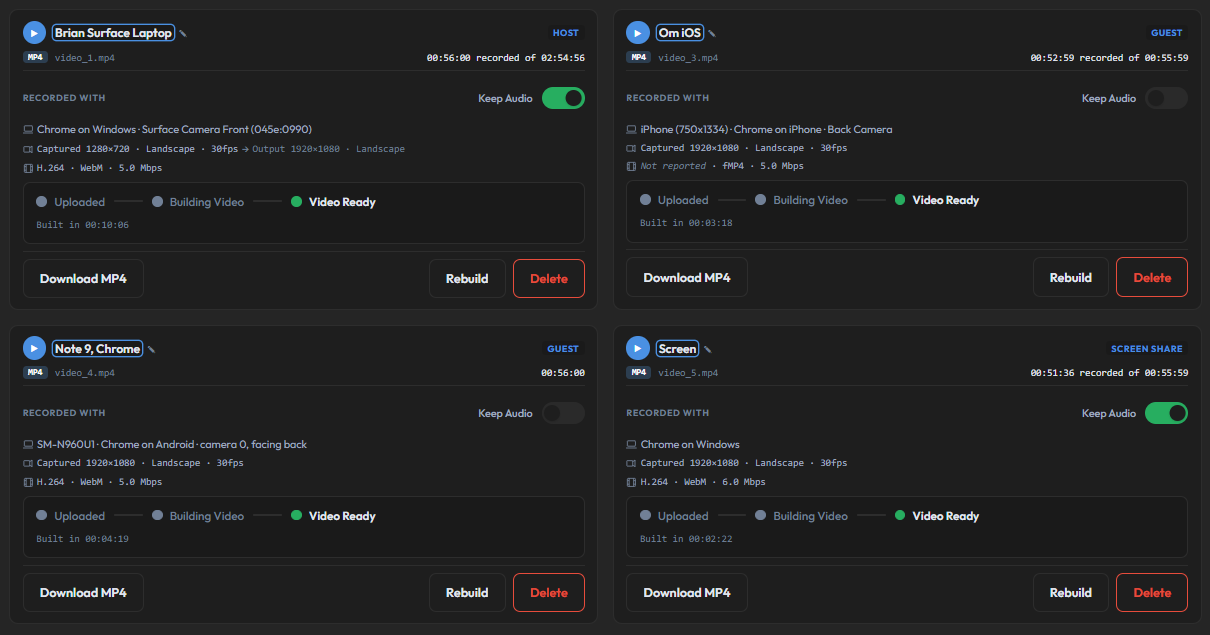
Redesigned the Recording cards so you can see technical details at a glance. Cards now appear for each participant and show status and messages clearly.
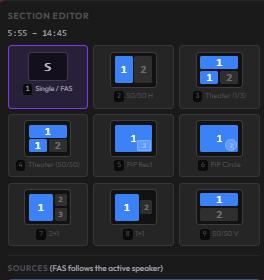
Added a new PIP to the layouts because circles are cool. Also added the ability to rotate a video 180 degrees, for footage recorded upside down.
Each person records on their own device? You can now line the files up before transcription starts so every lane plays in perfect harmony!
Two fixes to multi-camera exports.
Two more places to send your episode posts, straight from the Promotion calendar.
Run as many shows as you want on any paid plan. A second podcast, a client's show, a spinoff, all under one account with no per-show upcharge. Trials are limited to one show.
Catch and censor profanity right in the editor, with a bleep you control and clean text exports.
Our rebuilt editor graduates out of beta, with a visual refresh and a chapters fix.
Multi-hour episodes now scroll and edit smoothly.
We redesigned how the editor handles your transcript so editing feels faster.
Our new MCP server lets AI agents post and schedule social content for your show through a secure, per-show token.
The recording studio now shows each participant's headphone status at a glance.
Podcast performance metrics come into the app, and the Episodes list becomes a production tracker.
Quality-of-life upgrades to the Promotion calendar.
A tidier AI model list and more accurate speaker labeling in the editor.
Multiple text blocks on thumbnails, smarter episode navigation, and major transcription accuracy improvements.
Generate a ready-to-load teleprompter script straight from your finished episode plan, with one click on the Planning tab.
A new show-level Promotion tab brings every episode and evergreen post into one content calendar.
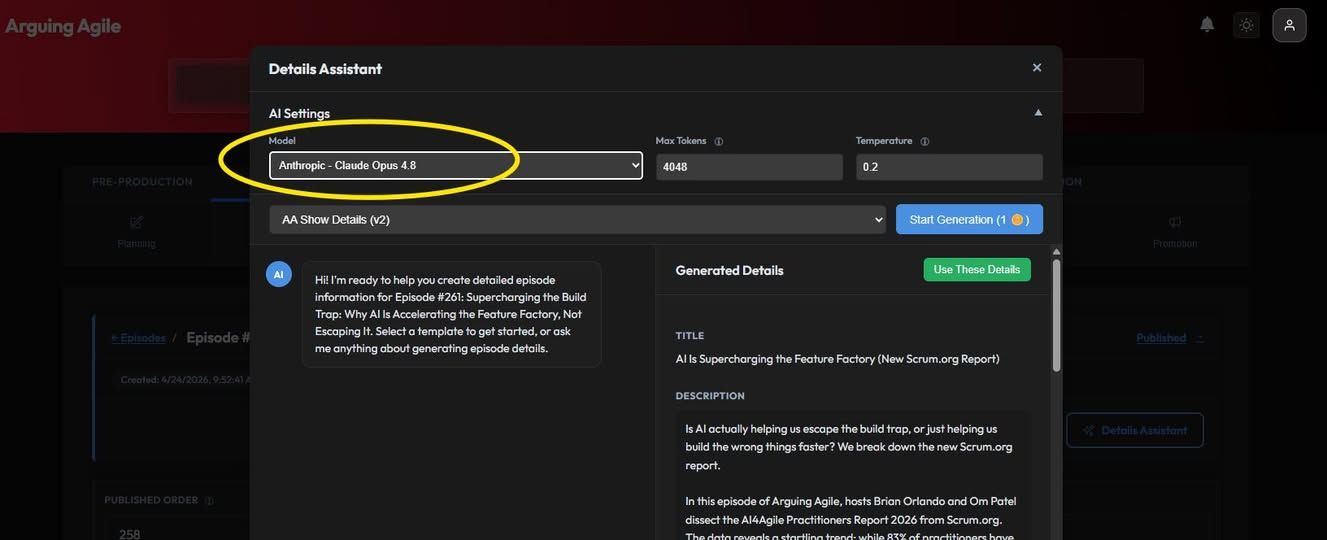
Added the newly released Opus 4.8 model to all assistants. Note, Opus 4.8 ignores the temperature setting. Always uses "High" effort. Made a note to allow effort setting in the future.
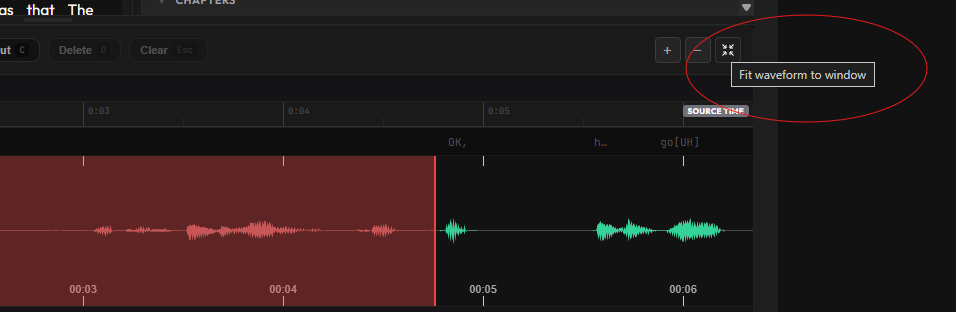
A small but useful addition to the editor's tools - the fit-to-window button. The waveform editor has +/- zoom buttons that control zoom levels. For long episodes (90+ minutes), going through the zoom levels was clunky. The fit-to-window button (⛶) is just to the right of the +/- buttons. One-click and the waveform scales to your container width, however long the episode is. Click +/- after using fit and the editor snaps back to the closest zoom level.
Two improvements to the Recordings tab. First, the original filenames are now kept and displayed on the track. Every uploaded clip now shows the filename you actually picked (Take3_BrianClose.mp4 instead of generic "Camera 1"). Second, you may now replace the video in any track directly. Previously, you had to remove all the previous videos in the track that came before the video you wanted to replace which was a pain! Hover any file in the track and you'll see a ↻ button next to the delete button. Click it to upload a new file in that exact spot. No more deleting all the downstream blocks just to swap one file in the middle.
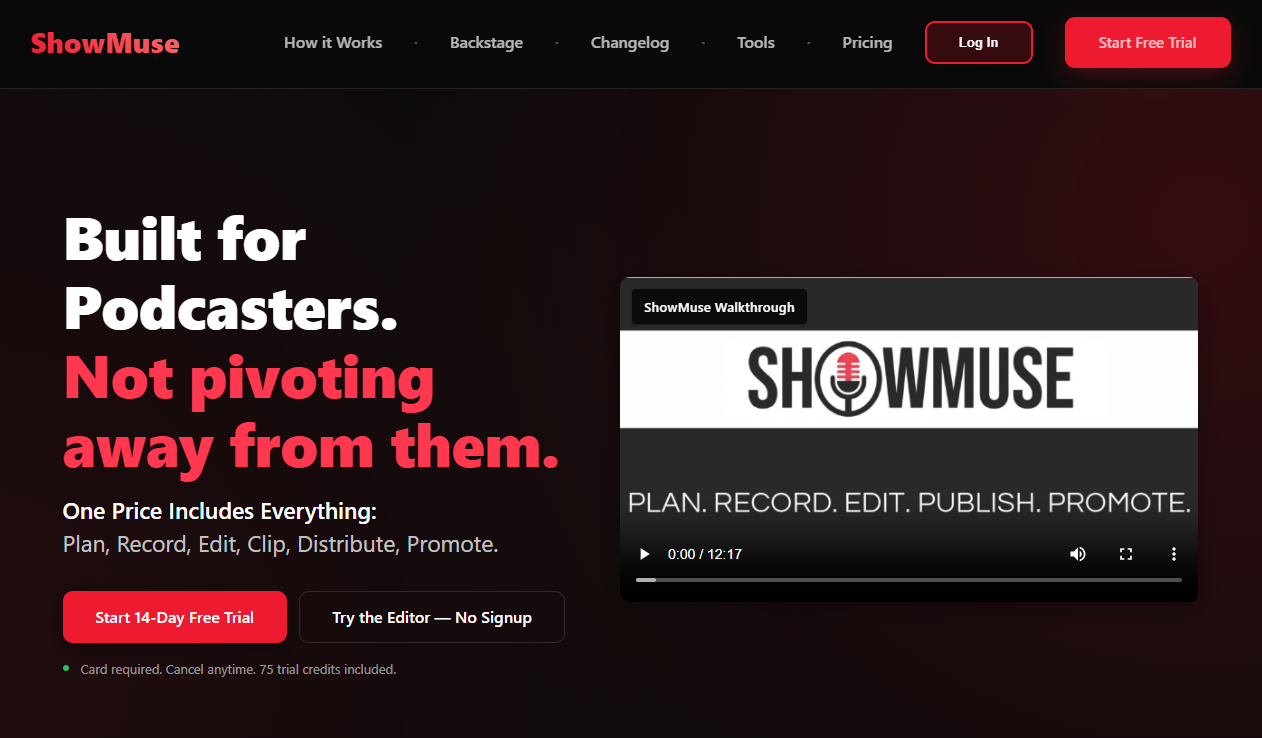
Adding a free trial so that users can now try ShowMuse for FREE! Trial users will be able to produce at least one full episode, and have enough credits to try out the features they will have access to for the paid plan selected.
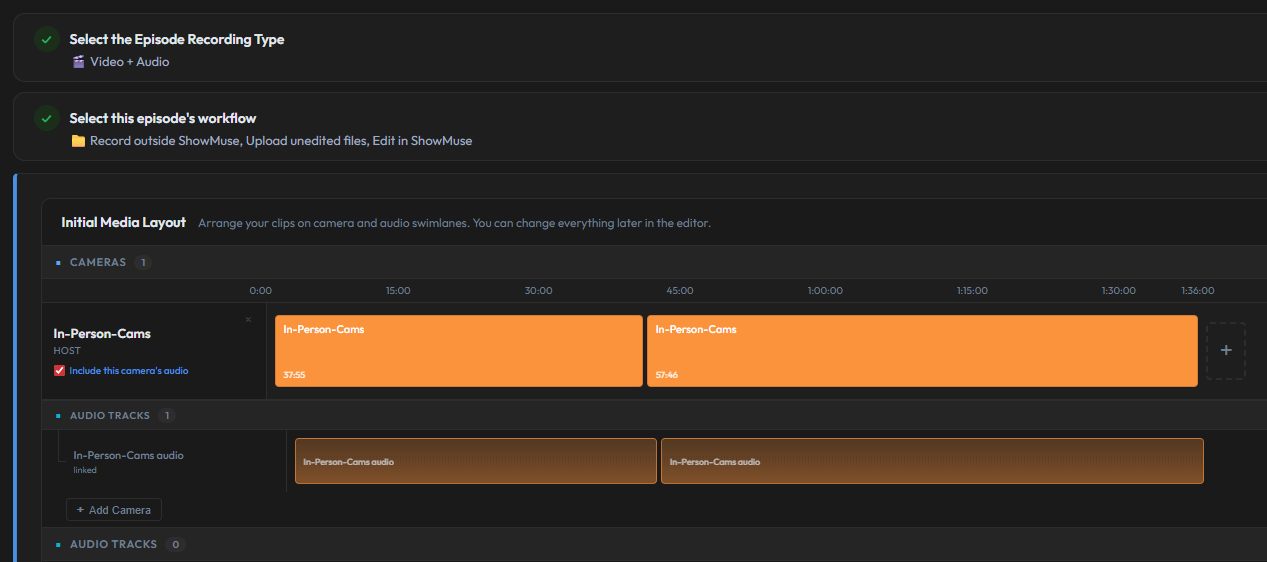
Multi-part uploads (one recording split across multiple files) was added with three enhancements in one go, from upload, to editing, to rendering. Fix 1: Ensuring smooth editing (no stutter at part boundaries) Fix 2: Allowing multi-part uploads with and without sound Fix 3: Ensuring rendering of multi-part episodes is handled
Every slideshow PPTX used to download as just "slideshow_YYYYMMDD.pptx." ...and you know what? It really bugged me because I'm typically working on at LEAST two episodes at once. Now they download as YYYYMMDD_EpisodeTitle.pptx. Date first, your real episode title (cut at 50 characters max if the title runs long). Safe across Windows and macOS. If the episode has a recorded date set, that's what shows up in the filename. Otherwise it uses today's date.
Claude Opus 4.7 was made available today, so I added Claude Opus 4.7 today! It's available everywhere AI is utilized, including: planning assist, details assist, clips assistant, campaign builder, and so on.
A handful of changes to the Recording tab that make the actual recording session MUCH nicer to use... Added buttons to allow the pausing and resuming of a recording session - useful if you need to grab water, go to the restroom, or your guest has to step away for any reason. Added audio-level indicators, per-participant so every participant has higher confidence in their volume before you hit record. Persisted recording-type across sessions according to your preference (set at the Show-level) so power-users don't have to re-pick each time. Added clickable Previews on Recordings layout-cards so you can check result of a video without having to download or render it. Multi-part recording support so if a session split into multiple files, the editor handles them as one continuous timeline. Improved performance on the Recording session components under-hood to ensure long sessions didn't get sluggish OR lower-powered laptops (like mine) didn't struggle!
Created the Audio Cleanup Tool
The Promotions page now allows the Campaign Builder to create posts for ALL social media platforms, even if the user has not yet connected to that platform.
Some very minor, cosmetic changes, but you'll probably notice them all right away. First, all confirmations have been swapped to new toast-style pop-up notifications in the corner. Also, the font for the whole app has been consolidated and standardized so it is cleaner, easier to read at smaller sizes, and has the single-storey "a" and "g" I love so much.
ShowMuse now streams directly to LinkedIn, YouTube, and Facebook. One session, three platforms, and the recording still saves clean for post-production.
Two fixes to the auto-chapter output. One to improve the prompt that drives chapter generation and another to the chapter bar in the player to improve it's look and feel. If you've been regenerating chapters, you should now get more accurate and cleaner results!
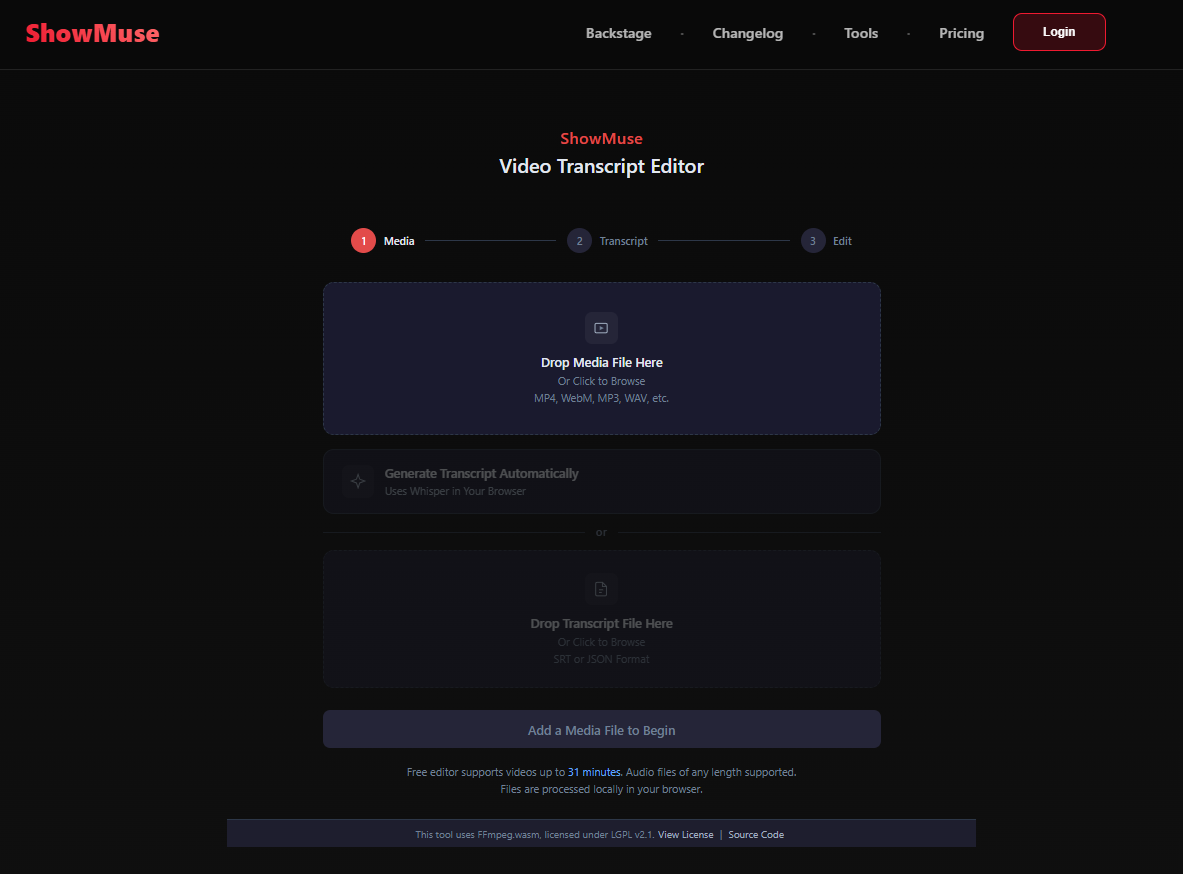
The free editor's file loading screen got a full redesign. There is now a clean 3-step flow: upload your media, choose how to get a transcript (generate or upload), then start editing. Each step lights up as you go, and the button text tells you exactly what's needed next. Also, transcription in the free editor now uses more CPU cores (when available).
The editor got two major upgrades: 1. The timeline is now a proper DAW-style interface, and we added a full multi-camera layout system. Each track (source video, video inserts, audio inserts, per-speaker audio) gets its own row with the label and content side by side. A tool bar at the top gives you play/pause, timecode, cut controls, and zoom without scrolling around. The Media Library panel slides over from the right. Drag files from the library onto insert tracks to add intros, outros, music beds, or b-roll. 2. Multi-Camera Layouts. If your episode has multiple camera angles, you now have several options: single, side-by-side (horizontal or vertical), picture-in-picture, 2+1, and mobile (vertical stack for Shorts/Reels). Cut between layouts with the B key, cycle layout types with Shift+B, and swap camera slot assignments with Shift+1/2/3. Toggle Follow-Active-Speaker (FAS) with F. FAS reads the transcript, maps speakers to cameras, and auto-switches the active camera based on who's talking. Manual overrides take priority.
I got really, really tired of not knowing how my clips were doing on YouTube, so we've now added a daily sync that refreshes the counts for a clip's views, likes, and comments. Even though we pull back the stats for each video less than 30 days old automatically, I added a "Check Stats" button for any clip so you could get fresh numbers on the spot. Stats show up right on the clip card, so you're not hunting through YouTube Studio for each video.
The Promotion tab got a complete overhaul. The new Campaign Builder generates an entire social media campaign from a single episode, across multiple platforms, in seconds. The big addition (that may not show in the interface) is voice matching. The system pulls your last 8 published posts per platform and uses them as a style reference. Also added an "Approval" step before anything goes live so you don't need to worry about things going out before they've been revised/optimized.
Added models: Claude Sonnet 4.6, DeepSeek V3.2, MiniMax M2.1, GLM 4.7, GLM 4.7 Flash, Kimi K2.5, and Qwen3 Coder Next. Models are available in ALL Assist functions, as always.
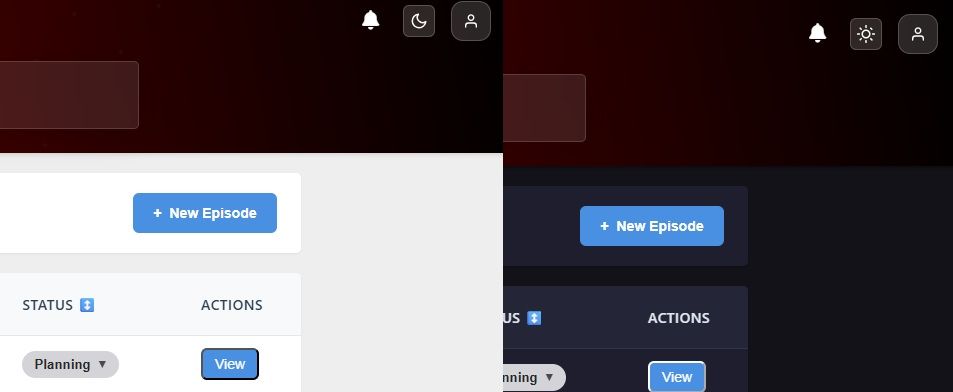
A toggle has been added to the top-right of the page that allows you to switch instantly between modes! Also, your preference is saved to your account, so it follows you across devices. If you haven't set a preference, ShowMuse respects your operating system's setting. Note, the editor main editing panels are always "dark mode."
Two fixes today, first, when the YouTube authorization expires, you'll now see a clear message telling you to re-authorize in the Credentials tab. Previously, this showed an unhelpful error. The second was a change to the editor's Silence detection/selection. The smart expansion when cutting silence now uses a more accurate method (uses voice activity detection) to prevent clipping word tails when removing silence.
Fixed a bug where, if you were editing the clip's settings while other clips render, the screen could refresh and you could lose your work. After the fix, your selections stay put! Also added a character limit for tags being uploaded to YouTube (YouTube's limit is 500-characters for tags) and a handy character counter to let you know when you're approaching the limit.
Fixed an issue where captions would drift out of sync when rendering clips, especially on longer videos.
Instead of just percentages (which didn't update frequently enough for me to feel like I knew what was going on), I added phases + percentages. Thumbs and Clips will now tell you what step/phase they are on and where they are at in that phase.
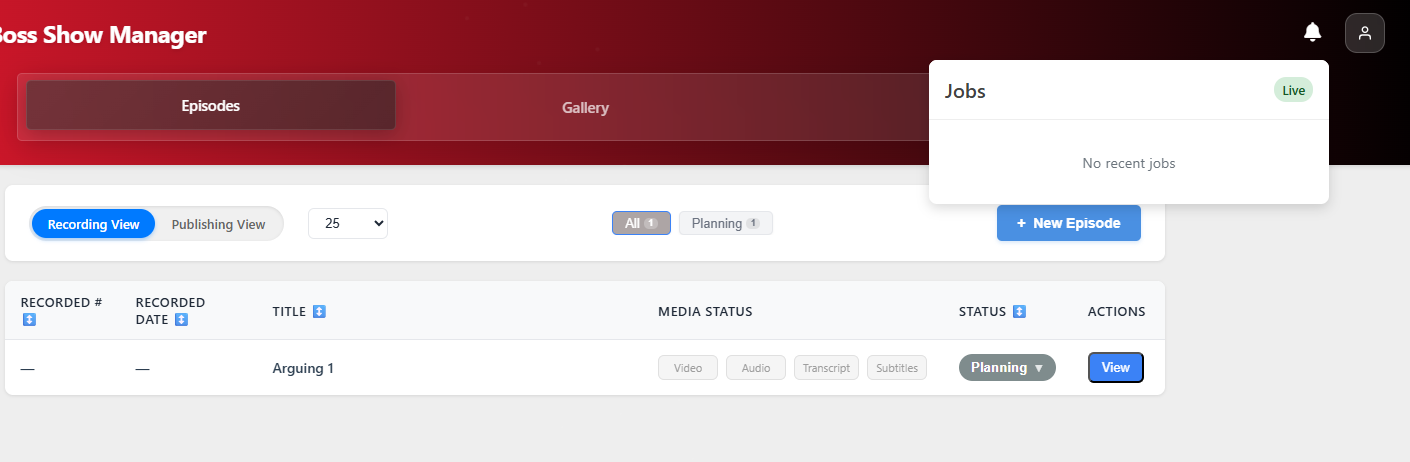
We needed a way to track all notifications from long-running jobs like thumbnail extraction and clip-rendering, so now we have a consolidated notification center (the bell icon) in the upper-right of the site!
Product Blog will now be available in the Backstage while the latest features and bug fixes will be noted in Changelog!